Vigil: A Menubar App for Claude Code Sessions
The Problem With Many Sessions
Once you start running Claude Code seriously, you end up with multiple sessions. One fixing a bug in the API, one refactoring the frontend, one writing tests. Each in a different terminal window or editor tab.
The question is always the same: which one needs my attention right now?
You alt-tab between windows trying to remember where Claude was waiting. You switch to a terminal only to find it’s been idle for ten minutes. You miss the session that needed a permission confirmation.
Vigil fixes this.
What It Does
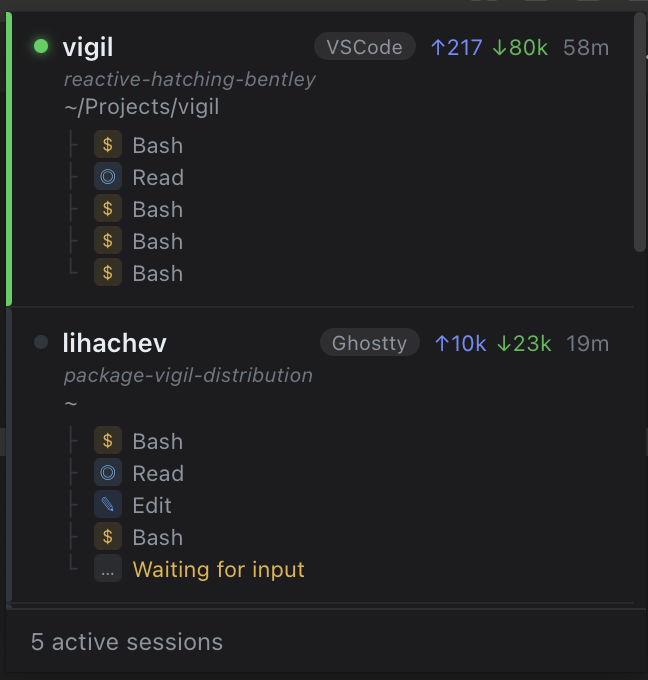
Vigil sits in your macOS menubar and polls Claude Code’s local data files every 3 seconds. Click the tray icon to see all running sessions - their current task, token usage, and which editor or terminal they’re in. Click any session to bring that window to front instantly.
Session statuses at a glance:
- Active - Claude is executing tools right now
- Waiting - Claude finished, needs your input
- Confirm - Claude needs permission to proceed
- Idle - no activity for 5+ minutes
No more alt-tabbing blind. One click shows you everything.
How It Works
Claude Code writes a lot of local data files. Vigil reads three sources:
~/.claude/sessions/*.json          → live process IDs + working directories
~/.claude/ide/*.lock               → VSCode / Cursor workspace mapping
~/.claude/projects/**/*.jsonl      → actions, tokens, session name, status
The monitor.Manager merges these into a session list, pushed to the frontend via Wails events every 3 seconds.
Clicking a session calls switcher.ActivateSession - which uses AppleScript and macOS Accessibility APIs to raise the exact window in your editor or terminal.
No server, no cloud, no account. Everything local.
Tech Stack
Backend:
  - Go 1.23
  - Wails v2 (Go + WebView bridge)
  - CGo + Objective-C (native macOS tray)
  - AppleScript + Accessibility API (window switching)

Frontend:
  - Lit (Web Components)
  - TypeScript
Wails was the right call here. Go handles all the file watching, process tree traversal, and macOS system calls. The frontend is just display logic - a Lit component rendering whatever the Go backend pushes.
The tray itself is native Objective-C compiled via CGo. Wails doesn’t expose a menubar API, so I wrote the status bar item in tray_darwin.m with Go callbacks exported via CGo. Small, fast, no dock icon.
A Few Interesting Problems
Session identification. Claude Code creates JSONL files named by session ID, but resumed sessions get a new ID while continuing the same work. Vigil falls back to the newest .jsonl in the project directory when the exact filename doesn’t match.
Status detection. There’s no explicit “status” field in Claude’s data files. Vigil infers it: if the JSONL was modified more than 5 minutes ago - idle. If the last assistant message is text only - waiting. If there’s a pending tool_use - active.
Window focus. macOS is picky about apps stealing focus. Using NSApp activate would pull focus away from whatever the user was typing. Instead Vigil calls NSWindow orderFront directly - the target window comes to front, but the user’s current focus stays intact.
Install
Download Vigil.dmg, drag to Applications, grant Accessibility access on first launch.
Source on GitHub. MIT license.